
Tech Notes: Staying Safe Online (Part 2 of 3)

Chad Droze Tech Notes header SAVE

7-spotting-out-phishing-attempts

Read Part One of “Staying Safe Online” Here

Today I will be discussing things to look out for when surfing the web. As you remember, we discussed how to spot out “Phishing” emails in our last discussion. E-mail has been an easy target for many years, but the bad guys are also very prevalent on the web. Here are some things to keep a watchful eye on when surfing the web.

Always Keep an Eye on the URL

droze-eye-on-url
Anyone can steal logos, color schemes, and other images to make a site look like the real thing. In any browser on any device, there is always the address bar usually at the top of the screen. If you suspect anything, check the URL to make sure it contains the real .COM address. In the Facebook example above, while the URL does contain the word FACEBOOK, the main address is really a bogus .CO (not .COM) address. It’s not necessarily that the site uses a .CO domain, but what’s sits before it is what really sticks out like a sore thumb.

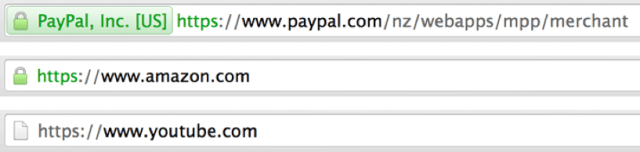
Look for the https:// or Lock Symbol when Signing In
droze-lock-symbol

When logging into most major websites, they use security encryption called HTTPS. Look for this in the address bar as well. Before you login, make sure you see this, or else be suspicious. And ask yourself – “How did I just get here?”. If you clicked in an email or a link from another site, then maybe you clicked on a bad link – there’s always that possibility. If you got to the website by clicking your favorites or saved bookmark, then you’re probably okay. The safest way to always get to the true website you are intending to visit is by typing in it’s web address (URL) into the address bar directly. URL’s are the equivalent of our Street Addresses.

Here’s a real life example. 121 Main Street is a different address than 112 Main Street, correct? Well google.com is different than goggle.com (TYPO!). Goggle.com may have been purchased by a scammer to catch those who type Google incorrectly. Don’t try going to the goggle.com to see I’m correct. My point is, be careful and mindful of incorrect addresses!

Watch for Ads that lurk on the edges of websites. They could lead you in a bad direction.

droze-watch-for-ads

At first glance, this may seem like your computer is telling you to update Adobe Flash, which is a legitimate program that your computer uses to display video and graphics on websites (Java is another). But definitely watch out for this one. This one is very prevalent out there on the web (especially when clicking through to links from Facebook). Note the use of ALL CAPS and the RED WARNINGS and the nicely colored GREEN DOWNLOAD FREE button. All an attempt to get you to click through and download this “fake” Flash program.

If this happens to you, you may have just gotten infected. Try to go back immediately. Click the X in the top corner. Leave – Go away – whatever it takes. If you must, shut down your device by pressing the power button. The longer you stay, the more infections you may be letting in. (NOTE: Stay tuned to part 3 of this series to find out how to remove an infection.) On this example, they clearly stole or made a very similar Adobe Flash logo. If you really want to update your Adobe Flash, then go to adobe.com directly in your address bar.

Facebook

Let’s talk about this for a moment since many of us now browse Facebook on a daily basis. For one, don’t fall for the “Facebook is going to start charging its users if you don’t do this……yadda yadda yadda” scam. Just ignore it. Facebook has never charged it’s users, and never will. Also, be careful about the “Free Stuff” or Coupons that you may see on Facebook and other social media sites. Now, companies to promote their products and services to Social Media and in many cases do offer free coupons to those who share or promote the product, but just use common sense. It’s always a good idea to use the “If it looks too good to be true, it probably isn’t” mentality when dealing with these things. Also, watch out for surveys and quizzes that you may see on Facebook. Again, there are legitimate ones out there, but if one of them wants to install “this or that” before you do it, you should probably just back away.

Clickbait

droze-clickbalt

This one is a relatively new term out there on the Internet. In fact, I just went to Google and asked “is Clickbait bad”. I read some sites out there but really couldn’t find a definitive answer. So, I put this one out there just to make you aware of how to spot it. To me, clickbait is like those sensationalized magazines that I would see at the checkout counter about “Man Gives Birth” or even the Enquirer Headline grabbing magazines. They can appear on legitimate websites but I’ve always noticed that each one tends to grab your attention the same way. For instance, it may say “6 Weird Diet Tricks that Doctors Won’t Tell You”. They just make me stop and think for a second. I’ve clicked on a few of them recently and while I did not get a virus, it just looked suspicious to me. I don’t really know yet what the true intent of these are, but perhaps they do have other motives.

In Part 3, we’ll talk about what to do in case you do fall prey to one of these tricks. Don’t worry, you’re not alone!

-Submitted by Chad Droze

www.compu-experts.com

www.twitter.com/c0mpuexperts

Lake House Tech Forum: Dropbox Tutorial and Training

Chad Droze
Chad Droze

Who should attend: Seabrookers who are interested in learning about Dropbox, one of the leader’s in cloud and file-hosting services that works on virtually all platforms.

Date: Thursday, November 17th
Time: 3:00 PM
Location: The Lake House
Expert Instructor: Chad Droze, Compu-Experts

Topics Covered:
*Learn what Dropbox is and what it can do
*Find out how to use Dropbox to access your files on all of your devices
*Learn how to send and share files through Dropbox

Since Dropbox is a cross-platform service, Apple and PC users are welcome to attend. Attendees are encouraged to bring their laptops and smartphones/tablets to follow along.

Registration: PRE-REGISTRATION IS REQUIRED TO ATTEND! FORUM IS LIMITED TO 40 PARTICIPANTS. WALK-INS WILL NOT BE PERMITTED. To register please email Janet Pasquale at jannyseabrook@gmail.com.

-Submitted by Lake House Staff

Tech Notes: Staying Safe Online Part One

This will be the 1st of a 3-part topic about an inevitable problem that any of us who use the computer will face at one point or another.  It’s called Phishing.  It’s a new word in today’s lexicon and there are numerous types of attempts to compromise your personal data.  Unfortunately, in an unregulated internet, there will be bad people out there trying to take advantage of unsuspecting users and catch them off guard.  They hope that one small slip by you the victim will give them what they need to gain what they want.  No matter what their intent is, their end game is usually all about making money in the sneakiest of ways.

Law enforcement is doing more and more these days to prevent and prosecute those who enact cybercrimes and attacks, but staying safe always starts with you the user.  Here are some quick tips for staying safe online.  You’ll never be 100% protected online, but these tips can lower the probability of becoming a victim of a cyber-attack. Continue reading “Tech Notes: Staying Safe Online Part One”

Lake House October tech forum is full

iphone and ipadThe Lake House Tech Forum, “Facebook,” scheduled for Friday, October 21, at The Lake House is FULL. We have reached the maximum number of attendees and registration is now closed.

If you have registered for the Tech Forum and will NOT be able to attend, please cancel your reservation to allow for those on the Wait List to be given an opportunity to attend. Reservation cancellations may be emailed to Janet Pasquale at jannyseabrook@gmail.com.

Please note that The Lake House will be offering more Tech Forums in the future. Check out the weekly SIPOA e-blasts and Tidelines to see the topics of upcoming Tech Forums as well as how to register early to reserve your spot.

-Submitted by The Lake House


Lake House Tech Forum: FACEBOOK

Facebook.png

 The Lake House Tech Forum

Topics of interest to Seabrookers of educational, cultural, or wellness value.

FACEBOOK

with Chad Droze of the Post and Computer Store

Who should attend: Seabrookers who are interested in learning about the world’s most popular social media platform, Facebook. This forum will approach Facebook from a newcomer’s perspective, but more advanced users may learn a thing or two as well.

Date: Friday, October 21st
Time: 3:00 PM
Location: The Lake House

Topics Covered:
*Learn how to create an account, post status updates and photos

*Find out how to connect to family and friends, as well as businesses and organizations

*Learn how to adjust essential settings to keep you safe and MORE

Registration: PRE-REGISTRATION IS REQUIRED TO ATTEND! FORUM IS LIMITED TO 40 PARTICIPANTS. WALK-INS WILL NOT BE PERMITTED. To register please email Janet Pasquale at jannyseabrook@gmail.com.

Fee: No Cost
Tech Experts: Chad Droze

Submitted by The Lake House

Have you joined Nextdoor Seabrook Island?

nextdoorpngNextdoor is a free, private social network for our Seabrook Island “neighborhood.” Think of it as a Facebook for our community.  On Nextdoor, you can communicate informally with all of us who are Nextdoor subscribers. In an exchange last month, one member offered a child’s bike for free and another made arrangements to pick it up. Neighbors can ask for recommendations, suggest a good service provider, and offer things for sale.

Nextdoor would be a great source to exchange information about Hurricane Matthew and its impact on Seabrook Island. Check in with your neighbors who stayed behind.

Nextdoor.com

-Submitted by Tidelines Staff

Tech Notes: The New Era of Television (Part 3 of a 3)

droze-headerRead Part 1 Here

Read Part 2 Here

So, this is the final part of my 3 Part Blog on Streaming Video, Cord Cutting, Smart TV’s and all the jargon that goes along with it. Hopefully you’ve read and decided if cord cutting is something that will work with your viewing lifestyle. Maybe you feel like it’s too early to make such a drastic change. That’s OK – like I mentioned in Part 1, it took me over a year to finally pull the trigger, and I’m still not entirely sure if my decision was the right one or not.

In this post, I will talk about the various services that exist that will allow you to stream the various content you are interested in. I’ll give a brief description of each along with a link to their website for more information.

-Netflix (www.netflix.com) – Probably the most popular streaming service out there. At around $10 per month, Netflix has 1000’s of movies- not really new releases though – it takes time for a new movie in theaters to eventually make it to Netflix. And Netflix adds content every month (and sometimes takes content away for a period of time). For TV Shows, it’s important to note that they have past seasons of TV shows, not current seasons (for current seasons, read about Hulu in the next paragraph). Netflix also has original programming which makes it a popular choice. If you’ve heard of “House of Cards” or “Orange is the New Black”, then you’ll only find those original shows on Netflix. No live programming on Netflix. Continue reading “Tech Notes: The New Era of Television (Part 3 of a 3)”

Lake House September tech forum is full

iphone and ipadThe Lake House Tech Forum, “Road Trip,” scheduled for September 27th at The Lake House is FULL. We have reached the maximum number of attendees and registration is now closed.

Please note that The Lake House will be offering more Tech Forums in the future.

Please check the weekly SIPOA e-blasts and Tidelines to see the topics of upcoming Tech Forums as well as how to register early to reserve your spot.

-Submitted by The Lake House

Lake House tech forum September 27

iphone and ipadROAD TRIP!

with Chad Droze of the Post and Computer Store

Who should attend: Seabrookers who are interested in learning useful travel apps. Even though this class will be taught using an Apple iPhone, Android users are encouraged to attend as well as many of the apps work on both.

Date: Tuesday, September 27th
Time: 3:00 PM
Location: The Lake House

Topics Covered:
*Discuss useful apps to take with you on your next trip out of town

*Learn about apps that help you find hotels, restaurants, and landmarks along your travels

Registration: PRE-REGISTRATION IS REQUIRED TO ATTEND! FORUM IS LIMITED TO 40 PARTICIPANTS. WALK-INS WILL NOT BE PERMITTED. To register please email Janet Pasquale at jannyseabrook@gmail.com.

Fee: No Cost
Tech Experts: Chad Droze

-Submitted by The Lake House

Tech Notes: The New Era of Television

droze header SAVE

“THE FUTURE OF TV IS APPS” – that’s what Apple’s Tim Cook has famously said in one of Apple’s annual Keynote Speeches that they give to introduce one of their new products. Last time I introduced the term “Cord Cutting” and how you may consider it at some point down the road. No matter if you plan on cancelling cable entirely, or just gradually phasing it out, if you want to stream television and video, you’ll need something to stream it with. Now, our smartphones and tablets are already set to stream (using the various apps and services that I’ll talk about next time), but I’m sure you and your family aren’t planning on gathering around a small screen and sitting on top of each other to watch a Netflix movie. So, how to we stream to our gigantic 50+ Inch Televisions. Well, there are a few ways.

Continue reading “Tech Notes: The New Era of Television”

Tech Notes: The New Era of Television (Part 1 of a 3-Part Blog Post)

droze-header.png

I can only imagine what it was like back in the 1950’s and 1960’s when the American family purchased their first television set. Black and white video, big antennas, big fat tube tv sets, a fuzzy picture- I wonder if anyone knew back then how it would change the world. Families gathering around watching a wholesome television show like “Leave it to Beaver”, or maybe witnessing history like the Apollo 11 Moon Landing or the Beatles debut on “The Ed Sullivan Show”. Television has certainly changed our lives. Over time, it has gradually evolved and adapted but the past few years have seen a decline in traditional TV service.

images

TV has changed because the average family has changed. Mom and Dad work different schedules, Brother doesn’t want to watch the same show that Sister watches. Sister has her own TV in her own room. Whatever the case may be, the average family doesn’t sit around the television like they did 40 or 50 years ago. Everyone’s on the go, staring at their tablets and phones watching the latest viral video. Our attention spans are shorter, demanding for video that we can start and stop as we please, as well as watch it on whatever device we happen to have handy.

I recently canceled my Cable TV service. I pondered doing this for at least a year before deciding to cut it altogether. My decision was based primarily around the rising cost of my monthly cable bill. Of course, you can call and threaten the cable company, and they may work with you, but I had read and done research on all these streaming video services that are cheaper, no contracts, and have a broad range of various programming that I can watch on my schedule.

I’m going to attempt to lay out all the various services and devices that exist that the cable companies hate to hear about because it means more “cord cutters” – those who have cancelled their traditional satellite or cable based TV service and watch their television streaming via the internet – are ditching their cable bills and thus the big cable giants are losing money. This post will discuss what to consider when thinking about cutting the cord. The next post, probably in a week or two after this one is published, will focus on the different devices that can stream television and video and finally, the final post will focus on services that stream various content and the costs, advantages, and disadvantages of each of those services. Continue reading “Tech Notes: The New Era of Television (Part 1 of a 3-Part Blog Post)”

Lake House August 18th Tech Forum full

The Lake House Tech Forum, “Siri, Can You Help Me?” scheduled for August 18th at The Lake House is FULL. We have reached the maximum number of attendees and registration is now closed.

Please note that The Lake House will be offering more Tech Forums in the future.

Please check the weekly SIPOA e-blasts and Tidelines to see the topics of upcoming Tech Forums as well as how to register early to reserve your spot.

-Submitted by The Lake House