Tech Notes: The Lighter Side of Technology

Happy summer, Folks! Hopefully, you all are out and about doing the things that we’re supposed to be doing in these summer months – staying cool, relaxing at the beach, traveling and vacationing, and spending time with family and friends.

Today I thought I would take a more light-hearted approach to today’s tech blog to discuss some phrases that we, as computer technicians, throw around every day to our clients. Now, there’s truth to what I say here, but mostly, take these in jest.  Many of you may have heard me mention these phrases to you. I say these not to single you out (you know who you are!), but hopefully, today’s blog will bring a smile to your face, and maybe you’ll pick up a tip or two to use for your next “computer crisis.”

You Say, “It Won’t Turn On.” We Say, “Is It Plugged In?”
Yes, it’s happened a few times. Getting that call from someone saying “Chad, my computer won’t turn on. I don’t know what happened. Is it dead?” We schedule a service call, drive out to the client’s home, and approach the patient (computer). We try pushing the power button. Nothing. No lights, no fans, no noises. Dead to the world!

Then, our eyes shift to the back of the desk, which is a collection of tangled wires and cords. And then suddenly, we see it. The shine of the metal prongs reflect back into our eyes and the problem is discovered. The cord is just lying on the floor, not plugged into the outlet- where it’s been for the last decade.

Voila! Power, fans, lights, beeps. The computer has life! In every instance, the story now shifts to a classic “Whodunit” scenario. Can we blame the cat? (Yep, happened a few times.) The housekeeper whose broom may have knocked the plug loose? (Happens quite often.) When the mystery cannot be figured out, then it’s the classic “computer gremlins” case. Continue reading “Tech Notes: The Lighter Side of Technology”

Privacy Policies and the GDPR

Hello Seabrook! Hope everyone had a nice Memorial Day holiday.

You may have seen a recent increase in e-mail from companies in which you have previously created an account concerning updates to their privacy policies. In fact, here is a recent snapshot of my email:

Did I open them and read all the fine print…. of course not. Who’s got the time for that? In fact, have you ever stopped to read what you agree to when you install a program or sign up for an account? Most people are just looking for the “I agree” button to continue along their merry way.

Today, I want to talk about why companies are sending us new updates to their Privacy Policies. The recent influx is attributed to a new regulation called the GDPR, the General Data Protection Regulation, which just went into effect on May 25th. The GDPR was put in place by the European Union (EU) for the purpose of protecting data privacy. This was started back in 2012 to make Europe more “ready for the digital age.” Four years later, the terms were agreed on, and just last week, the laws are now governing these digital companies. It basically means that companies have to be more explicit in what data they have about you and how they plan to use it. The new policy also allows users to request a copy of all the data a company collects from you, as well as being able to request that the company deletes the data. If they fail to comply, they are subject to steep fines according to the GDPR.

Continue reading “Privacy Policies and the GDPR”

Tech Notes: Terms to Know – Augmented Reality

Happy Spring, Seabrookers!

From time to time, I like to give you readers, many of whom are my regular clients, a glimpse as to what’s ahead in the world of tech. For me, it’s interesting, especially in the tech industry, to look ahead to see “what might be,” or, in some cases, “what could have been.”

Remember a few summers ago when people (young and old) were in public parks and streets playing “Pokémon Go” from their mobile devices? It was all the rage for a short amount of time.  Even though the game is still played, the initial buzz has died down and playing of the game has since tapered off. But, unbeknownst to many, it was an important moment in technology, as it brought the phrase “Augmented Reality,” or “AR,” to the vernacular.

What is “AR”?  Is it just for playing silly games on your smartphone? As it turns out, no, but “Pokémon Go” was one of the first mainstream uses of AR technology. In short, AR is the mixing of technology and “the real life.” AR brings components of the digital world into a person’s perception of the real world. The best way to understand AR is to envision future practical ways that you could utilize it.

It’s important to mention here that “AR” and “VR” (Virtual Reality), are slightly different. VR is entirely virtual. AR is partly virtual. The best way to understand this is that VR usually requires special goggles or lenses to experience. You might know someone, maybe your grandchildren, that own a pair of VR lenses, which may enhance their enjoyment of a video game or app. Continue reading “Tech Notes: Terms to Know – Augmented Reality”

Tech Notes: Goodbye, Buttons

Hello, Seabrookers. Today, I want to bid adieu to an old friend. This friend was someone you could always count on to do what you needed to do.

I’m talking about buttons.

Right now, you’re probably scratching your head wondering where I’m going with this. Stay with me, folks. I promise we’ll tie in technology here shortly.

Buttons used to be on everything. Radios, phones, appliances. You name it. There was a button on it. Buttons had a long, useful life. It was predeceased by its relatives….

Knobs, Dials, & Switches

OK, enough with the eulogy. What I’m trying to getting at is a bigger picture of today’s technology. Continue reading “Tech Notes: Goodbye, Buttons”

New Year’s Tech Resolutions

Happy 2018 Everyone!

I hope everyone had a happy and joyous holiday season.  As 2018 begins, I’m reminded of how different things are with each passing year.  Technology has aided us with new innovations to make everyday tasks much quicker and more seamless than ever before.

We all have probably made our New Year’s resolutions to stop doing “this” and do more of “that” in 2018.  Have you already failed?  Hopefully not.  As your resident techie here at Tidelines, I thought I would share with you some helpful New Year’s “Tech” Resolutions that you can commit to for the coming year.

Embrace This Tech Stuff

So, as I have come to meet many of my Seabrook clients, many are set in the ways of doing things the way they’ve always done them.  With some things, that’s fine, but in my world, this technology changes too fast – fast enough that if you don’t commit to trying to learn and understand it (even if it’s a partial understanding), it will pass you by.  What are some ideas we can come up with that indicate we are embracing technology? Continue reading “New Year’s Tech Resolutions”

Tech Notes: The Anatomy of a Phishing Email


Hello Everyone!

Just thought I’d drop in on Tidelines to share a recent phishing email I received that even had me second guessing for a minute or two.  These scammers are really getting crafty in their attempts to fool us into their sneaky scams.  In today’s world where everything is connected to the world wide web, it’s imperative that you stop for a minute and carefully inspect suspicious emails and website popups when they appear. I share these stories so that you may look at my thought process when trying to decide whether or not something is legitimate, or just an attempt to fool me.

The Email Shows Up

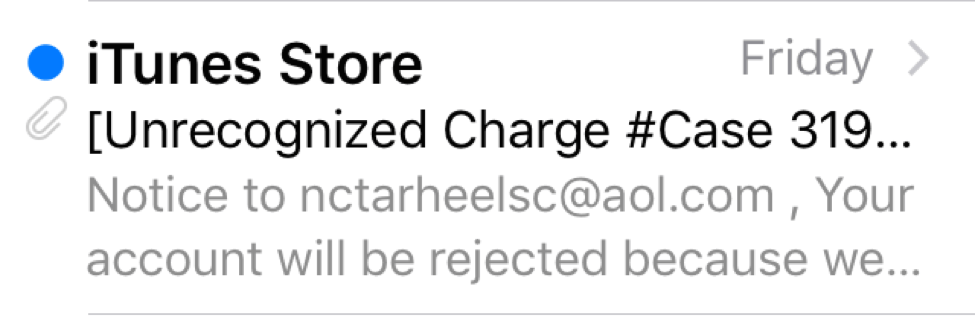
So, here is the email as it appeared on my phone.
Now, since I own Apple products, I didn’t immediately delete it.  If I’m an Android user and owned no Apple products, then it wouldn’t make sense for me to consider it real.  I see this a lot, especially with banking and financial institutions.  Scammers don’t have to know which accounts you have.  Take a fake bank e-mail for instance.  Why open an email with the subject line of BANK OF AMERICA: YOUR ACCOUNT IS SUSPENDED when you are a customer of Wells Fargo?  Don’t even consider it.

Ok, back to the email I received.  So, since I own Apple products, I paused to consider it. But I also saw the part about iTunes Store and thought “I do occasionally buy songs and movies from the iTunes Store”, so I thought even further.  So I decided to take a look and open it.  This is where many people get worried (which is good), but let me assure you of this:

It’s not the opening of the email that will harm your device, it’s the clicking of links within the email or the opening of attachments that can and will cause serious problems.

So, I opened the email.  Here is where I started to think to myself “I don’t have a Case Number with Apple (Clue #1).  So I started reading:


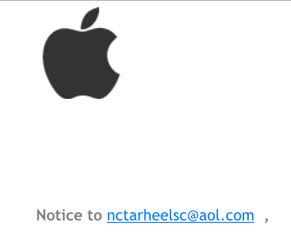
Apple Logo – if this were really from Apple, then I would expect to see this logo.  However, don’t trust logos.  Scammers can easily steal logos and put them in fake emails.  Much like if someone were to knock on your door wearing a Comcast shirt and hat.  Doesn’t mean they are real.

PDF Attachment (Clue #2) – so I didn’t see any links in this e-mail (links redirect you to websites) but the email did have an attachment – almost trying to get me to believe it was an invoice or something.  Attachments from people you know are okay.  Attachments from unknown senders are NEVER okay!

Inspect the Sender’s E-mail Address (Clue #3) – so, even though the sender is identified as “iTunes Store,” anyone can put any name they want, but if you press the name (on a tablet/smartphone) or hover your mouse over the name (on a computer), you will see the email address listed.  Lots of times, this email address will have nothing to do with the company they are pretending to be.  In my case, the sender’s address was no_reply.email.apple.com_mailerid_HWHABGEI9LI7N.support@delivery-daemon-group.org.  Way too long an email to be trusted.

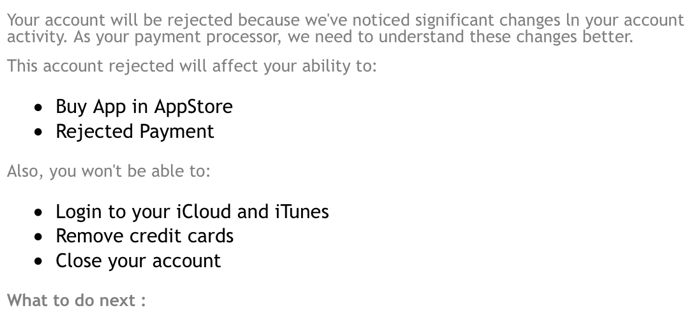
Incorrect Grammar (Clue #4) – After careful inspection, I stumbled on this sentence near the end of the email: IF NOT THE TRANSACTION YOU DID FOLLOW THE STEP IN THE PDF FILE.  This was the clincher.  Bad grammar and spelling mistakes are most likely indicative of non-English speaking persons who are trying to trick you.

After gathering all the clues, I decided this email was fake, so I then trashed it.  Some emails are more obvious to suspect as a fake than others, but you really have to operate under these two theories 1)  Assume all suspicious emails are fake until they give you a reason to believe it’s legit, and 2) If an email gives you a funny, uneasy feeling, then consider it a fake.  No reason to fall for these schemes if you don’t have to.

While we are in the midst of the holiday season, the online shopping craze is in full effect.  Scammers are going to use this time of the year more than other times.  Be leery of emails claiming your order is canceled or held, your shipment is delayed, or your account is suspended.  Just when you let your guard down, that’s when the bad guys will strike.

Be careful out there!

-Chad Droze
Post & Computer Center – Freshfields Village
chad@compu-experts.com
843-768-2626
http://www.twitter.com/c0mpuexperts

 

Tech Notes: Sending Large Files Over the Internet

This month’s tech blog post continues our discussion of computer tips and tricks that require just a few simple steps.  Today’s tip focuses on sending large amounts of files to someone else.  But first, let’s talk about the big limitation of how most of us send files to each other – through e-mail.

E-mail is a communication medium that’s been around quite a while.  Over 40 years to be exact.  Now, for many of us, we may have only been sending e-mails for about 20 of those years, since it was really in the 90’s that computers became affordable to have in the home.  However, one limitation of e-mail that I’m surprised has not improved is sending large files to someone.  My rule of thumb is to not exceed 10MB on any outgoing e-mail or else you risk the e-mail getting stuck in the Outbox and causing other e-mails not to send. 10MB, which seemed large back in the 90’s, is now considered very small.  This is equivalent to about 3 photos taken with a common smartphone. Continue reading “Tech Notes: Sending Large Files Over the Internet”

Tech Notes: Saving YouTube Videos

I love technology.  Many of you who know me already know that.  People often ask me, “What’s your area of expertise?”  My answer is usually, “Nothing.”  I realize I’m probably selling myself short, but when people know you as a computer guy, they will hand you any sort of technology problem and expect you to fix it.  My motto as a person in the computer field is “Familiarize yourself with everything.”  Breadth is more important than depth.  If I said I can only fix computers of Type A and a customer comes in with Type B and C, then, to them, my knowledge is of little value. Continue reading “Tech Notes: Saving YouTube Videos”

Ever wonder?

Have you noticed those blue reflectors in the road scattered around the island? They appear in the center of the roadway. One of our readers asked if Tidelines knew what they were, so we asked Steve Hirsch, PE, PMP, Director of Engineering, Seabrook Island POA, and he said they mark the location of fire hydrants. For a little more information, see this article reprinted from slate.com.

If you have a question that you have wondered about, send it along to seabrookislandblog@gmail.com and you may find your answer here.

(Photo credit: wikimedia.com)

-Tidelines Editor


Tech Notes: For the Music Buffs

I said in my last blog post that I would talk about the ways we all can listen to our music.  In my opinion, technology and the internet have changed the music industry quicker than any other industry.  As my clients have become more comfortable with doing the basics with technology (like sending email, paying bills, and surfing the web), perhaps now you may want to start learning leisure skills, and one of those skills could be finding and listening to digital music.  No matter if you like listening with headphones on an afternoon walk on the beach, or just having it play in the background while you’re around the house, today’s talk should give you a broad view of how we can purchase, listen to, and enjoy our favorite genres of music.

Buying vs. Streaming

A good place to start would be to decide whether you want to purchase and store your music on your device (whether it’s your smartphone, iPod, computer, or external hard drive) or pay and stream your music “on the fly.”  Both have advantages and disadvantages.

When buying music, the advantage is that it’s a one-time cost to purchase the song or album.  This is akin to buying the record or tape back in the “good ol’ days” (you never could purchase a single song, could ya?).  Also, a good thing is that when you buy it, you can play it on any of your preferred music players.  What qualifies as a music player?  Nearly every gadget.  Computers, smartphones, tablets, iPods, Amazon Echo, Apple TV, Roku- the list goes on! Continue reading “Tech Notes: For the Music Buffs”

Ever wonder?

A reader recently inquired if solar panels would still provide electricity in the event of a power outage. Our research suggests they might but it depends on several factors. Homes equipped with solar power using photovoltaic (PV) technology “may lose power in the event of a grid outage if their system does not include some form of energy storage,”  according to Third Sun Solar.  That energy storage and battery backup can be prohibitively expensive.  Click here to read more from the Environmental Defense Fund website.

If you have a question, send it along to seabrookislandblog@gmail.com and you may find your answer here.

(Photo credit: U.S. Air Force)

-Tidelines Editor

Tech Notes: Streaming Television Checkup – 1 Year Later

Read my article about Streaming Television from Last Year by clicking here.

For this blog post, I thought I would revisit a topic that I introduced to Tidelines last year. The topic is Streaming Television. As the internet that is being delivered into our homes gets faster and faster, it can present you with the option of “cutting the cord” and allowing your television to be streamed wirelessly via your internet. If you were like me, I found that the small amount of time that I watch television didn’t justify the amount of money that I was paying each month for it. So, last year I cut the cord and 1 year later, I can honestly say that I haven’t wanted to go back to traditional cable. I’m still able to watch the same amount of live television that I always watched in the past, and because I was able to save roughly $50-$75 month by stopping cable, those savings have added up for me big time over the past year.

Let’s talk about what’s new and what has changed since we discussed this last year.

Sling TV – https://www.sling.com/ – still my go-to choice for live TV. Starting at $20/month- this is what I use when I want live news (although still no Fox News or Local News) and my live sporting events. Throughout this year, I could have canceled it anytime, but the thought never crossed my mind. My wife and I also enjoy catching our favorite shows “when they air” versus having to buy the episode from iTunes the following day (although when we missed the show, we did buy the episode for a few dollars the following day via Apple iTunes Store).

Hulu – https://www.hulu.com/live-tv – we talked about this last year for a large selection of previously aired television shows, but since then, Hulu has made Live TV available (starting around $40/month). A bigger selection than Sling and also a feature called Cloud DVR make this one something to look into.

YouTube TV – https://tv.youtube.com/welcome/ – rumored to be available later this year.  Another streaming television service that starts at $35/month. The verdict is still out on this one as it’s not yet available in South Carolina.

DirecTV NOW – https://www.directvnow.com/ – Just started late last year. Offered by AT&T, this is a streaming service that again starts at $35/month for the top channels.

There are many reasons why it makes sense to start looking into this for your television needs:.

1) Since this TV runs entirely on your internet, television cables do not need to be ran throughout your home. This is also why most of these services have no contracts. but……. because it runs on your internet (either wired or wireless), it will require you to possibly improve your wireless signal and strength with a more advanced router with newer technology that gives you better speeds and stronger signals.

2) For those who have multiple residences and pay for television in both places, this will save you even more money. You only need one master account so you’d only need to pay for it one time.

3) Let’s say your TV has died and you’re in the market for a new one anyway. Most TV’s are “Smart” anyway. It’s becoming harder and harder to find a “Non-Smart” TV. Since you’ll buy a new TV anyway, you already be one-step closer to using these services.

For movies, most people I come in contact with already understand that Netflix and Amazon’s monthly services are pretty much the gold standard when it comes to streaming movies, but did you know that Apple and Google also these movies on a “per rental” basis. Why do I bring this up? Let’s say you watch only a few movies each year. Rather than pay over $100/year for Netflix and Amazon, you can rent the movies through Apple (using Apple TV) or Google (using Chromecast) for a few dollars.

The idea of Cord Cutting is really about personalizing what, who, and how much you decide to pay to provide access to live TV and movies and taking control. Chances are, you already pay one of the cable giants for this anyway. Why not take control of this? Tailor it to your individual preferences. If you do it sooner rather than later, you’ll get a jump start on what is inevitably going to become the norm.

Next time, I want to talk to those of you that love music – and I have met quite on Seabrook. Stay tuned!

-Submitted by Chad Droze

Post & Computer Center – Freshfields Village, 843-768-2626

chad@compu-experts.com, http://www.twitter.com/compuexperts